Podcast: Human Element team members Eric Leslie, Kevin Gardner, and Dane Dickerson discuss the pros and cons of using AI in our daily work.
When Human Element was founded in 2004, eCommerce was still finding its footing. The dot-com bubble had just burst. Pets.com had burned through $300 million and collapsed. Webvan had promised to revolutionize grocery delivery and instead became a cautionary tale. The businesses that survived that era — Amazon, eBay, the early Shopify merchants — were the ones that translated new technology into real, proven value for their customers. The ones that failed were betting on technology as a substitute for value, not a multiplier of it.
Twenty years later, we’re watching a similar transformation unfold. AI is everywhere. Everyone wants it. And just like the early days of eCommerce, there’s a widening gap between companies using AI to create genuine value and companies slapping “AI-powered” on their marketing pages and calling it a day.
We’re not claiming to have all the answers here. But we’ve done the work to integrate AI deeply into real, tangible value for clients — not as a gimmick, but as a tool. Here’s what that looks like.
How We Plan with AI
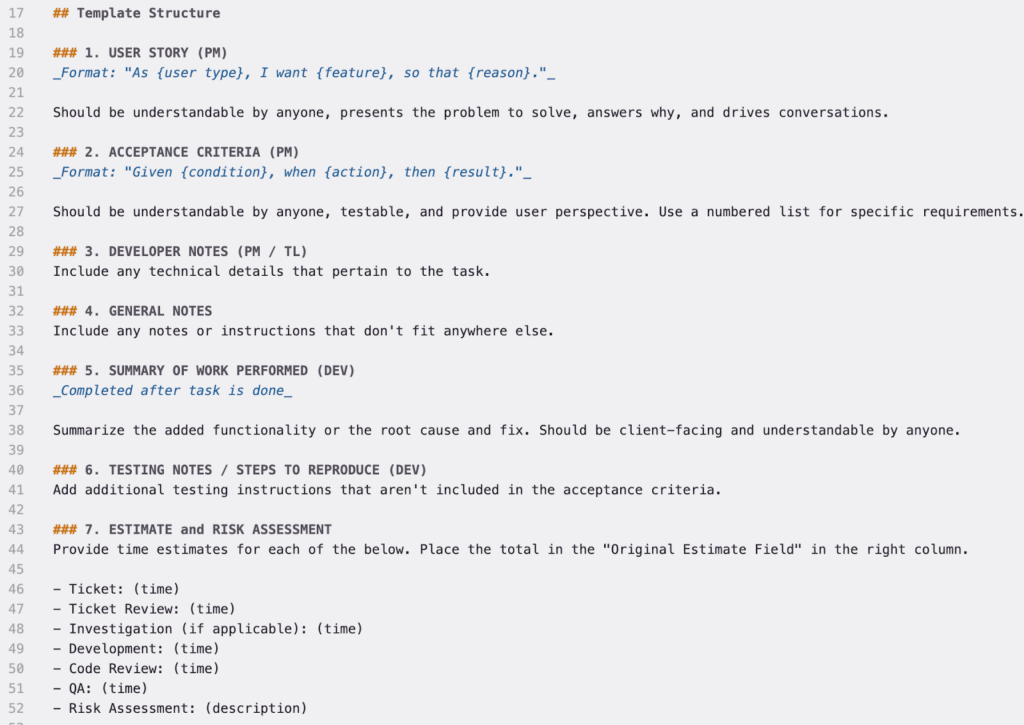
Our development process has always been built around user stories. Every piece of work starts with a story that explains why we’re doing it, who it’s for, and what value they get out of it. We pair that with clear acceptance criteria so everyone knows what “done” looks like. Every ticket has a defined structure — user story, acceptance criteria, developer notes, testing notes, estimate and risk assessment — and it’s been refined over years of human-powered work for clients.
AI hasn’t changed any of that; we’re not abandoning our proven process any time soon. What AI has changed is how we gather and organize the context around that work. If you’ve ever worked in eCommerce — or really any kind of project management — you know that a huge chunk of the job is collecting information from meetings, Slack threads, emails, client calls, and scattered documents, then synthesizing it into something actionable. AI tools are genuinely good at this!
One example: after a client meeting, instead of manually combing through notes to pull out action items and draft tickets, we can point our AI tools at the meeting notes and say, “Pull out the tickets we need to create and draft them.” Then we review together. The information was always there — AI just makes it dramatically faster to structure.
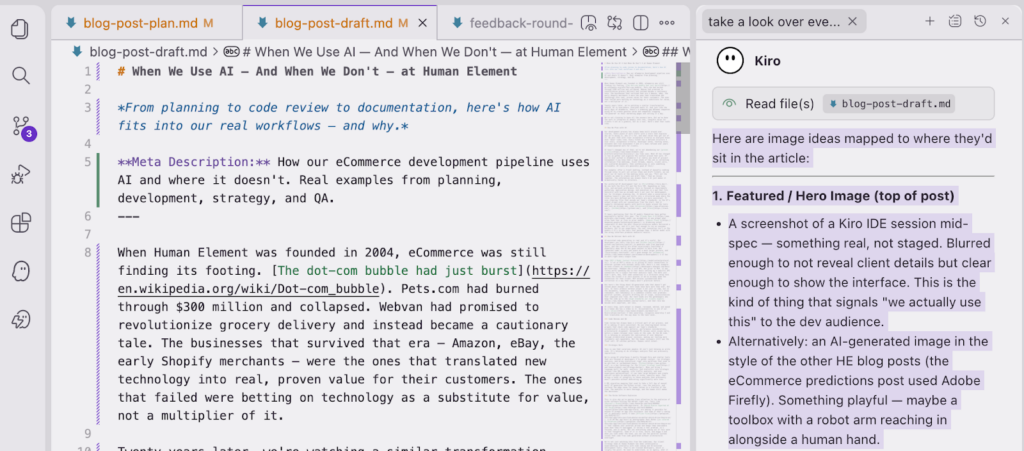
Our preferred AI development tool is Kiro. We use both the Kiro CLI and the Kiro IDE, depending on team, role, and personal preference. Kiro is focused on requirements gathering, application design, and execution in a way that fits naturally with how we already work — not just for development, but for strategic planning too. It detects when a conversation is heading toward a spec and shifts into a structured mode where the rules are more defined and the outputs are more consistent. It uses steering files that encode our team’s standards, so the AI’s output aligns with our conventions from the start. And it supports customized agents with built-in hooks around the tools and tech we already use, like Atlassian, GitHub, and Slack.
It bears mentioning that the AI models themselves have gotten meaningfully better this year. The Claude Opus 4.6 model can accomplish in one prompt what often took four or five in prior models. Gemini Flash 3 is producing output comparable to what the most resource-intensive models delivered a year or two ago, and it’s just fast enough to run on consumer hardware. But in our experience, the real innovation isn’t in the models — it’s in the tools that package them. A better model with the wrong interface produces mediocre results.
How We Deliver Work with AI
AI-assisted code generation is real and it’s useful. Our developers use tools like Kiro and GitHub Copilot to generate code from approved specs, and the results are often surprisingly functional — especially when the AI has good context to work from. But “generate code” is only one piece of a much larger picture, and “surprisingly functional” isn’t good enough for eCommerce – it has to work right every single time.
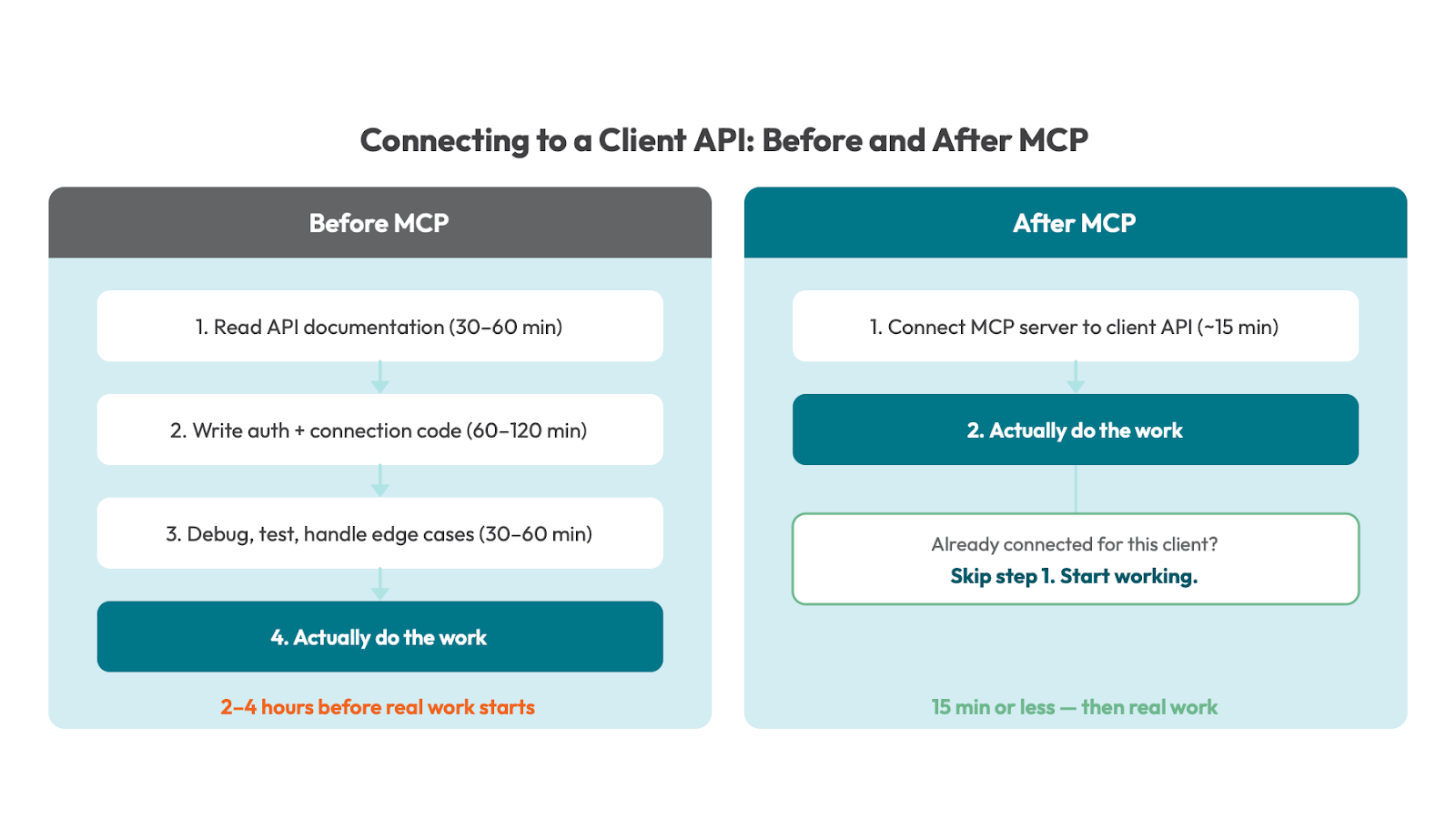
Take MCP — Model Context Protocol. A lot of MCP’s value is in giving AI tools connections to external systems with minimal setup time. Here’s a real example: we have clients on HubSpot. HubSpot has a rich API, but prior to MCP, it was rarely worth spending two to four hours setting up a specific API connection for a single four-hour analysis task. The math just didn’t work. Now, that same connection is a 15-minute setup task within the ticket — or zero minutes if we’ve already made the connection for that client. MCP unlocks systematized data collection in a way that simply wasn’t practical before.
But here’s the thing about AI-generated code that doesn’t get talked about enough: our tech leads have more work than ever. Not less.
AI tools produce verbose output — not just in code, but in the documents, summaries, and findings they generate. It’s often redundant. And redundancy in a codebase creates real problems: parallel systems, projects drifting out of scope, inconsistencies that compound over time. Our tech leads are the gatekeepers who keep the code up to the high standards our clients expect, and that role has become more important, not less.
At every step, work output is shaped, reviewed, edited, and owned by a human who has a stake in it. Accountability is one of our core values — take ownership, recognize ownership — and that translates all the way down to the task level.
Code Review and QA
Code review has always been a critical part of our process, and AI is making it more consistent. We use steering-based review prompts that check code against our team’s standards automatically — security patterns, performance considerations, architectural alignment. Automated PR reviews catch issues early, before a human reviewer even looks at the code. On the QA side, AI is helping us automate the replication of user behavior through orchestrated browser sessions, making our testing more systematic and repeatable. But the human reviewers still own the final call. AI catches patterns. Humans catch intent.
Strategic Work
This is one that surprises people: AI isn’t just helping us write code. It’s helping us do strategic analysis that was previously impractical.
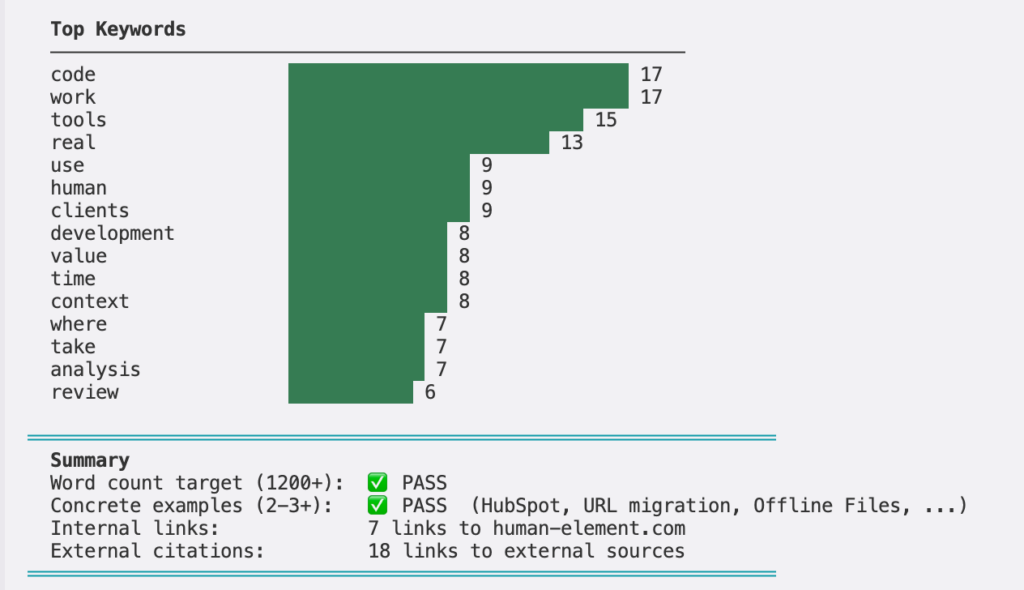
We’re using AI interfaces — mostly through Kiro and similar tools that are focused at developers — to gather context, run strategic analysis, and bring statistical rigor into workflows that used to be gut-feel or spreadsheet-heavy. Python is a key technology for the client strategy team. When you bring a language built for math, analysis, and statistics into strategic actions like URL mapping, site traffic analysis, and user experience optimizations, it can take large datasets and create one-off scripts to analyze data in niche, specific ways. That brings a level of integrity to those analyses that previously wasn’t possible without dedicating significantly more time.
A URL migration mapping that used to take a full day of manual work? AI generates the Python script, runs the analysis, and surfaces the edge cases for human review in a fraction of the time. The analysis is more thorough, and the human still makes the decisions.
The Niche Software Explosion
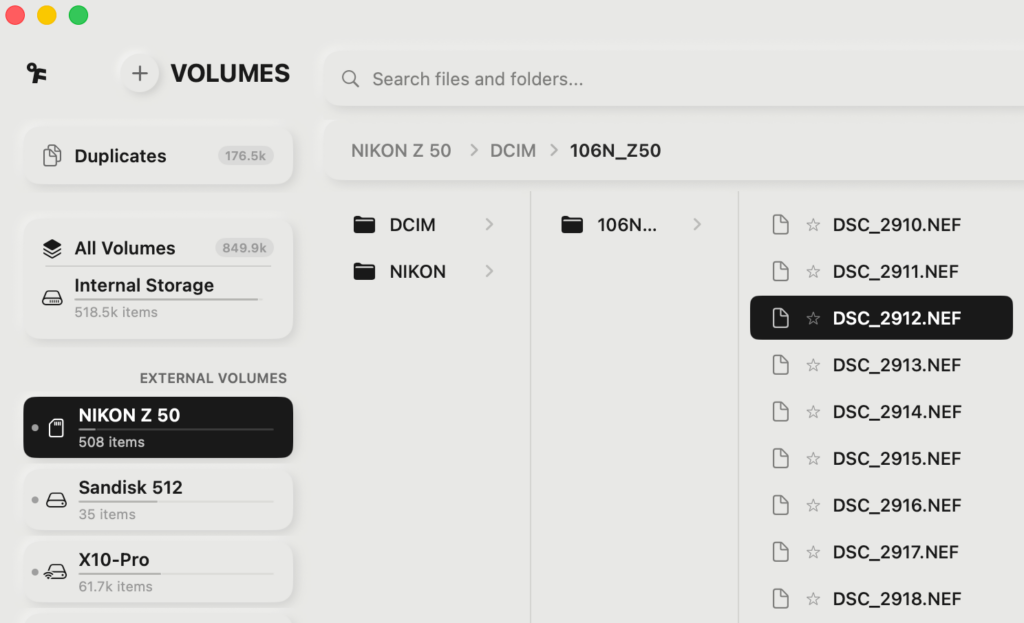
This is also why we’re paying close attention to the explosion of niche software hitting the market right now. Tools like Raycast’s Glaze, as David Pierce reported at The Verge, are making it possible for anyone to prompt an app into existence. And some of what’s coming out is genuinely useful — take Offline Files, a $7.99 Mac app built by photographer Paul Kothe (as covered by PetaPixel) that indexes your external drives and keeps them searchable even when they’re unplugged. It solves a real problem, it’s focused, and it works. But not everything coming out of this wave is that thoughtful. Some of it is slow, weird, and buggy — and when you look under the hood, you can see the parallel systems issues that come from code generated without architectural oversight.
We’re not just watching this from the sidelines. Our client strategy team at Human Element has been intentionally experimenting internally with vibe coding and AI-assisted development tools. They’re not trained developers, which is largely the point. We need to understand, as an agency, what it looks like when these programs and extensions are created by non-developers. That’s the code we will see from new clients, third-party extensions, and from technologies in our clients’ tech stacks. We’re building our own standards within our AI Center of Excellence to handle it.
How We Document and Communicate with AI
Nobody’s writing blog posts about documentation workflows. But this is where AI has quietly saved us the most headaches. The biggest efficiency gains we’re getting from the tools across the company aren’t in code – they’re in closing the loop on tickets.
When the same interface can post to Jira, draft an email, send a Slack message, create comments in Jira with tagging, and generate linked Confluence documents — all from the same session, sometimes the same prompt — the completeness of our work goes up significantly. The shortcuts that people used to take because documentation was tedious? They don’t save as much time when documentation is this trivial.
Meeting summaries and note-taking are the easy examples. But it goes further. In our sales process, AI parses running meeting notes during client discovery calls, surfaces the questions we should be asking right then and there, and extracts answers from our loose notes when they’ve been given but not flagged. It helps us build contracts and proposals in real time from information that’s already in the pipeline. Our clients get more thorough, more responsive service out of their existing hours.
What We’ve Learned
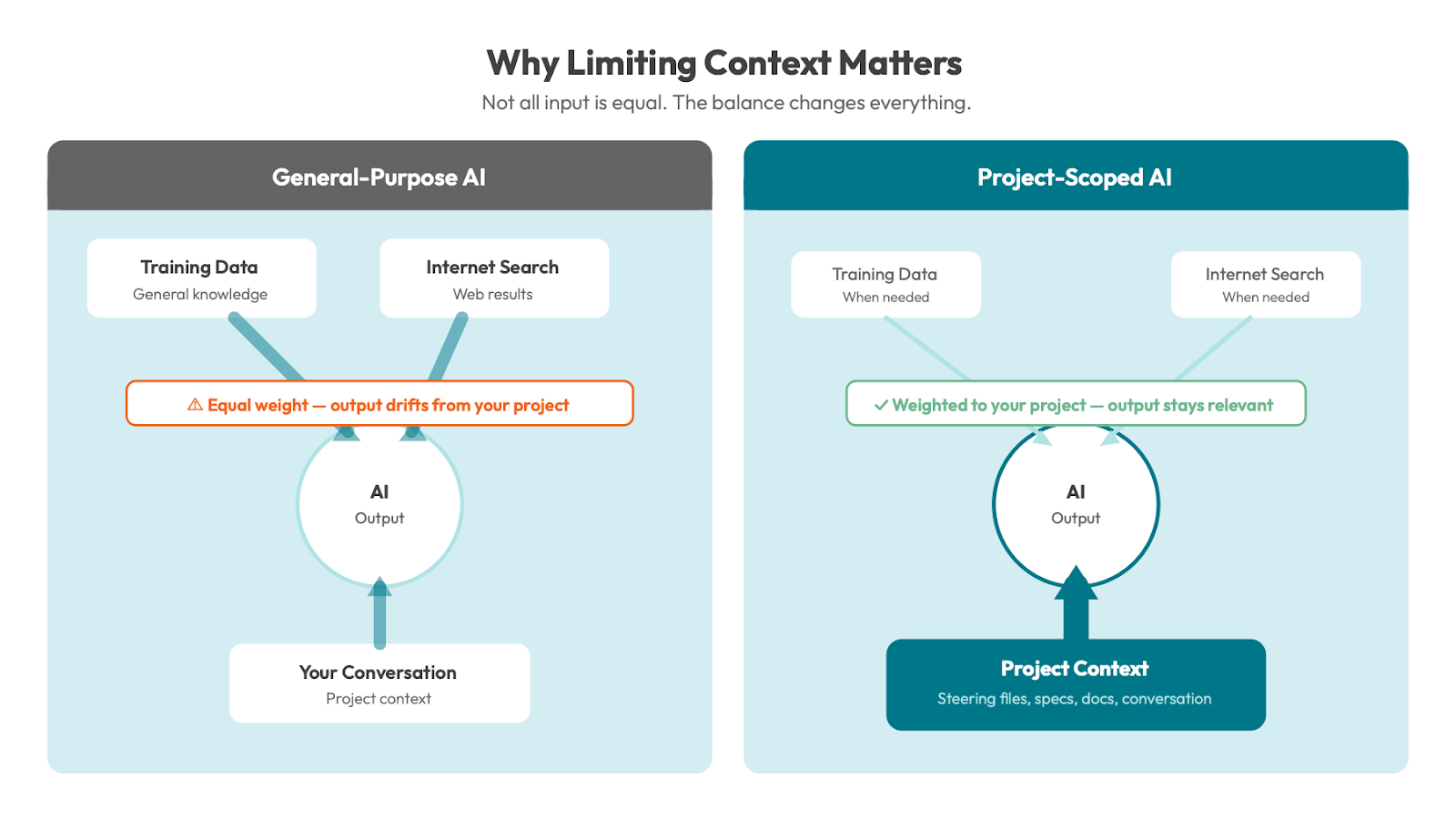
Limiting context is a value add. It sounds counterintuitive, but critical to understanding this space today. General-purpose AI tools like the ChatGPT web interface give roughly equal weight to their training data, internet searches, and your conversation. That’s the wrong balance for professional development work. We want our tools to lean heavily on the project context, the conversation, and our internal knowledge — and only pull from general training data or the internet when we specifically need it. This is why tools like Kiro, with their steering files and project-scoped context, outperform general-purpose chatbots for the work we do.
Steering and structure matter more than the model. The best model in the world will produce mediocre results if you haven’t set up the right guardrails, conventions, and context. The tooling around the model — how you interact with it, what rules it follows, what standards it enforces — that’s where the real leverage is.
The biggest wins aren’t in code generation. They’re in reducing friction across the entire lifecycle — from planning to documentation to communication. Code generation makes headlines, but saving 60 seconds per-task at scale is transformational.
Use it where it’s useful. Don’t where it isn’t. This isn’t about replacing developers, and there is no “use AI everywhere” directive at Human Element. The directive we give our team is simple: if a task will take longer with AI, produce worse output, or be harder to do, don’t use it. If you don’t know whether AI will help, it’s worth an experiment. There’s a big difference between “worth an experiment” and “use it as a rule.”
Where We Go from Here

We’re still iterating on all of this. So is the world.
This is the frontier of AI-driven development, and the landscape is changing fast. What we know for sure is that the companies that will succeed — both agencies like us and the clients we serve — are the ones that keep a relentless focus on value over hype.
AI is also fundamentally changing how customers discover and interact with businesses online — how your brand shows up in ChatGPT, Perplexity, and other AI-driven search experiences. That’s a whole other conversation, and one we’re actively helping clients navigate.
For now, we’ll keep doing what we’ve done for twenty years: translating new technology into real results, with real people who care about the work. The tools change. The values don’t.