When I talk with B2B manufacturers and distributors about eCommerce, the conversation often stalls in the same spot. They know their customers want faster answers about stock, pricing, and order status. They also know what a full eCommerce build involves: platform licensing, design, catalog cleanup, content, marketing, and someone to keep it all running after launch. That’s a big commitment to make before you know the channel will pay off.
Our partner iPaaS.com recently released something that gives those companies a smaller first step. Their new MCP server, currently in beta, lets an AI assistant like Claude work directly with the data flowing through your iPaaS.com integrations. You ask questions in plain language and get answers from the same product, customer, and order data your ERP already holds. No new screens, no report requests.
I’ve written before about why API-first architecture matters for modern B2B commerce and why multi-store commerce matters for B2B companies. Both of those posts were about getting your systems ready for a bigger commerce operation. This one comes at it from the other end. What’s the smallest useful thing you can do with the data you already have?
What the iPaaS.com MCP Server Actually Does
MCP stands for Model Context Protocol. It’s an open standard that lets an AI assistant use outside tools. The iPaaS.com MCP server gives an assistant more than 240 of those tools for working with your iPaaS.com account.
Those tools cover products, variants, and inventory. They cover customers, including B2B customer companies. They cover transactions like orders and invoices. They also reach into the integration itself, meaning mappings, webhooks, errors, and logs. On top of that, there are built-in business reports for sales performance, inventory health, and stuck orders.
Right now it works with Claude (including Claude Desktop and Claude Code), Cursor, VS Code with GitHub Copilot, and Gemini CLI. ChatGPT isn’t supported yet because of how its connectors handle authentication.
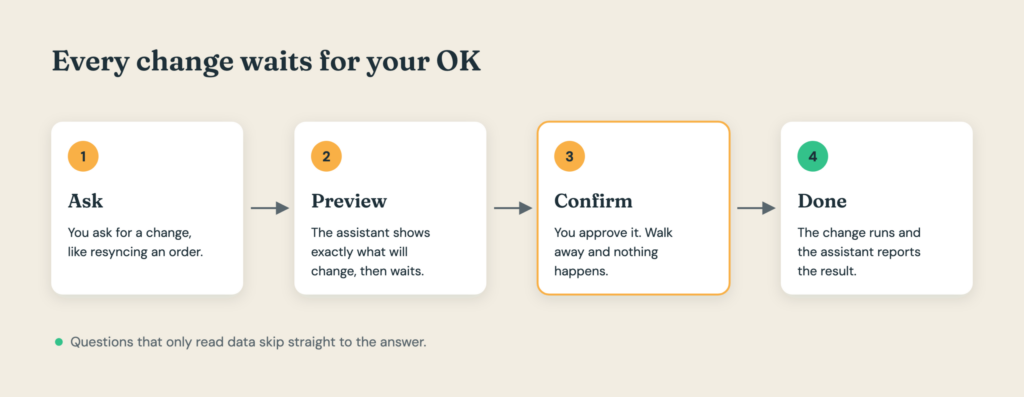
The design choice I like most is how it handles changes. Anything that only reads data just runs. Anything that creates, updates, or deletes something shows you a preview first and does nothing until you confirm. That matters a lot once people outside your integration team start using it.
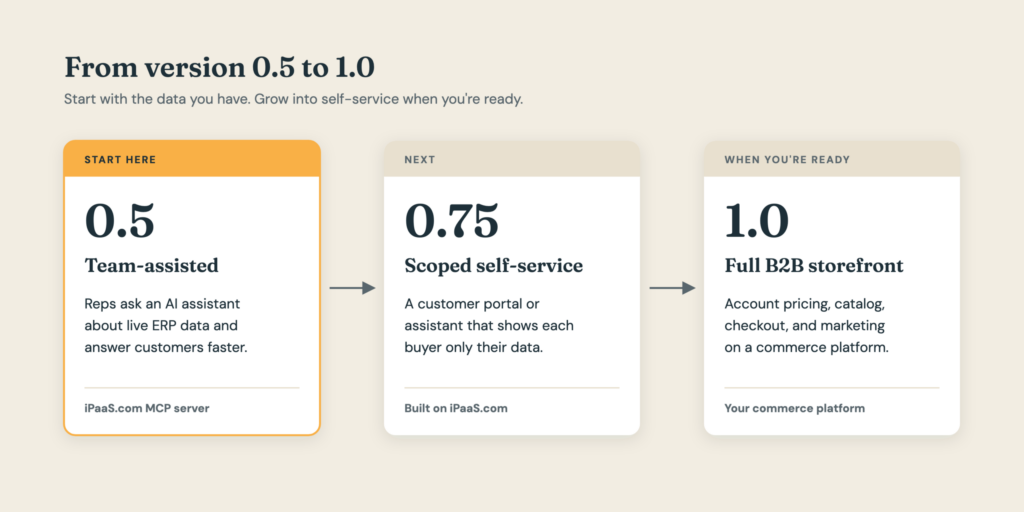
Version 0.5 of Your Web Presence
A full B2B storefront is version 1.0. It has customer logins, account pricing, a searchable catalog, checkout, and all the content and marketing that keep people coming back. Plenty of companies aren’t ready for that yet, and some aren’t sure they need it.
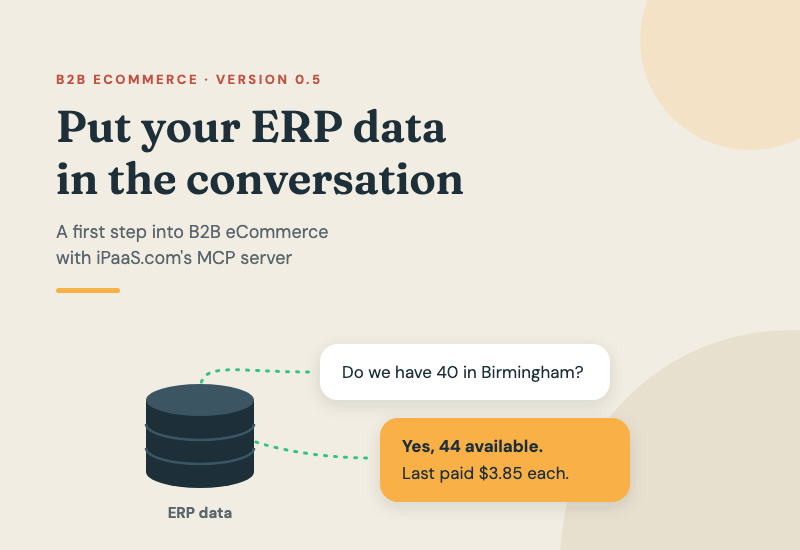
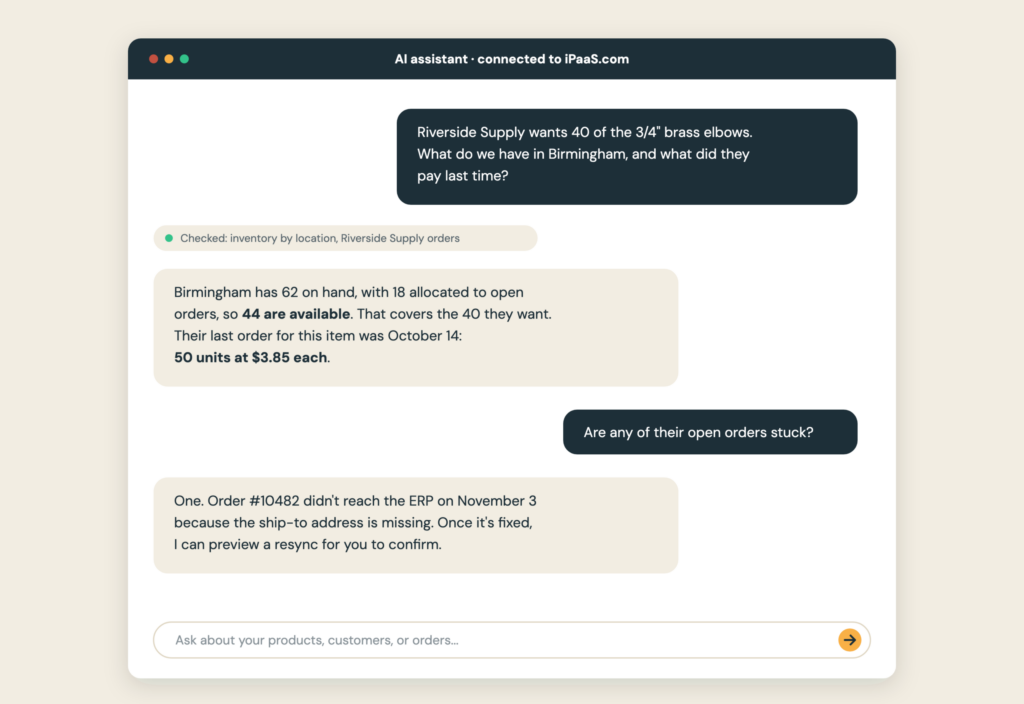
Think about what happens today when a customer calls your inside sales rep. They want to know if you have 40 of a specific fitting at the Birmingham warehouse, and what they paid on their last order. Your rep digs through ERP screens, maybe checks with the warehouse, and calls back an hour later.
With the iPaaS.com MCP server connected, that rep asks the assistant the same question in plain English. The answer comes from live data while the customer is still on the phone. That’s what I mean by version 0.5. Your customers aren’t logging into anything new, but they’re already getting the speed and accuracy they’d expect from a good self-service site.
I want to be clear about who holds the keys here. The MCP server connects with a company-level iPaaS.com API key, and that key can see everything its permissions allow across your account. It’s built for your team, not something you hand to a customer. In this model, your reps talk to the assistant and your customers talk to your reps.
So why call it a first step into eCommerce? Because using it teaches you what a storefront would need. Once your team starts asking questions of your data, you find out quickly whether product descriptions are complete, whether customer pricing is right, and which questions customers ask most. That’s discovery work you’d otherwise pay for at the start of a platform project.
When you’re ready for customer self-service, whether that’s a scoped portal, a customer-facing assistant built on top of iPaaS.com, or a full B2B eCommerce site, you’ll be building on data that has already held up in real conversations.
What That Looks Like Day to Day
Here are a few questions a sales or customer service team could ask on a normal Tuesday:
- “Which of Riverside Supply’s orders from the last 30 days haven’t shipped yet?”
- “What were our top 10 products by revenue this quarter, and how’s inventory on each?”
- “Pull up open invoices for Acme Plumbing and tell me what’s past due.”
- “Which products in the fasteners category are running low at the Atlanta location?”
None of those needs a custom report or a developer. They just need the data to be flowing through iPaaS.com, and if you already run an integration there, it is.
Getting More From an Integration You Already Run
If your ERP already syncs with Shopify, BigCommerce, or Adobe Commerce through iPaaS.com, the MCP server adds a new way to work with that integration.
Take a failed sync. Normally someone has to log into the portal, find the error, figure out what went wrong, and push the record through again. With the MCP server, your operations lead can ask why yesterday’s order from a key account never made it to the ERP. The assistant can diagnose the error and check whether related records landed. With your confirmation, it can also resync the order. The same goes for reviewing field mappings or pulling a sales summary across every connected channel.
As Jason wrote in The Hidden Complexity of B2B eCommerce Integrations, building an integration is only half the job. Keeping it healthy is the other half. The MCP server makes that second half a lot more approachable for people who aren’t integration specialists.
Why iPaaS.com Makes This the Easy Part
The MCP server is useful because of what sits underneath it. iPaaS.com uses a hub-and-spoke model in place of one-off, point-to-point connectors. Your ERP, your storefront, and your other systems each connect once to the hub, and the data comes through as products, customers, and transactions. The assistant talks to iPaaS.com and never has to learn your ERP’s API.
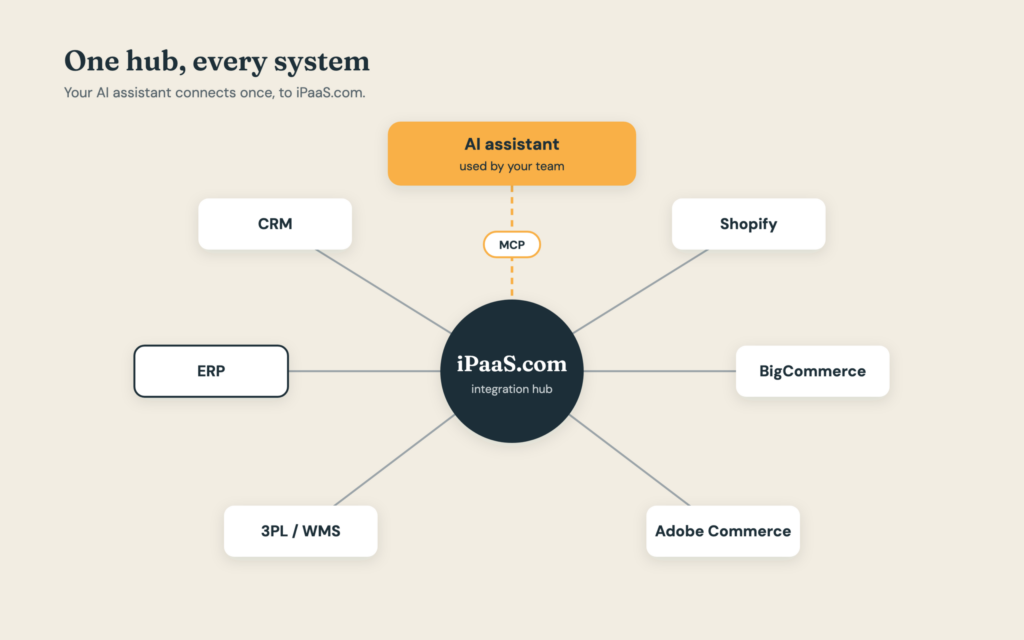
That’s also why the MCP setup is short. iPaaS.com’s getting started guide puts it at about ten minutes. You create an API key with the permissions you want, add the server as a connector in Claude or another supported app, and ask it which iPaaS.com company you’re connected to. If it answers, you’re in.
It’s a big part of why we partnered with iPaaS.com earlier this year. iPaaS.com brings the platform, with queued transactions, automatic retries, error reporting, and role-based access already built. Human Element brings the integration planning and the ERP and commerce platform experience to make it fit your business.
Start Small, and Start Safe
This is a beta, and iPaaS.com is upfront about it. Features may be added, changed, or removed as development continues, so treat it as a tool to explore rather than one to build critical processes around today.
iPaaS.com’s own safety guidance is worth following. Use a read-only API key for everyday questions, and keep a second key with change permissions for planned work. Their overview puts it plainly: “With great power comes great responsibility – the MCP can do things like trigger a sync for your entire catalog and modify (or remove) data from your account.” iPaaS.com also notes it isn’t responsible for restoring data or configuration changed through the MCP.
And like any AI assistant, it can be wrong. Check its answers before you quote a ship date or a price to a customer. Read-only questions are a low-risk way to start, and they’re where most of the version 0.5 value is anyway.
Final Thoughts
Not every B2B company needs to jump straight to a full storefront. For a lot of them, the better first move is to get the data they already have into a form their team can use in conversation with customers. The iPaaS.com MCP server is one of the most approachable ways I’ve seen to do that, and it works on top of integrations many companies are already running.
If you’re curious what your ERP data could do in a conversation, or you already use iPaaS.com and want to get more out of it, Human Element can help you set it up and figure out where to go from there.